



Estimated reading time: 15 minutes
Why this category matters
The browser has become the primary runtime for productive work. The shift from “give me a summary” to “do the work for me” changes demands: you now need software that understands page context (the DOM), can operate across tabs, securely use your logged-in sessions and either run locally for privacy or rely on cloud services for scale. Agentic browsers and web agents reduce manual repetition but require careful choice: the wrong tool can mis-handle credentials, fail on dynamic sites or produce brittle automations.
How we selected these Top 17 Agentic Browsers
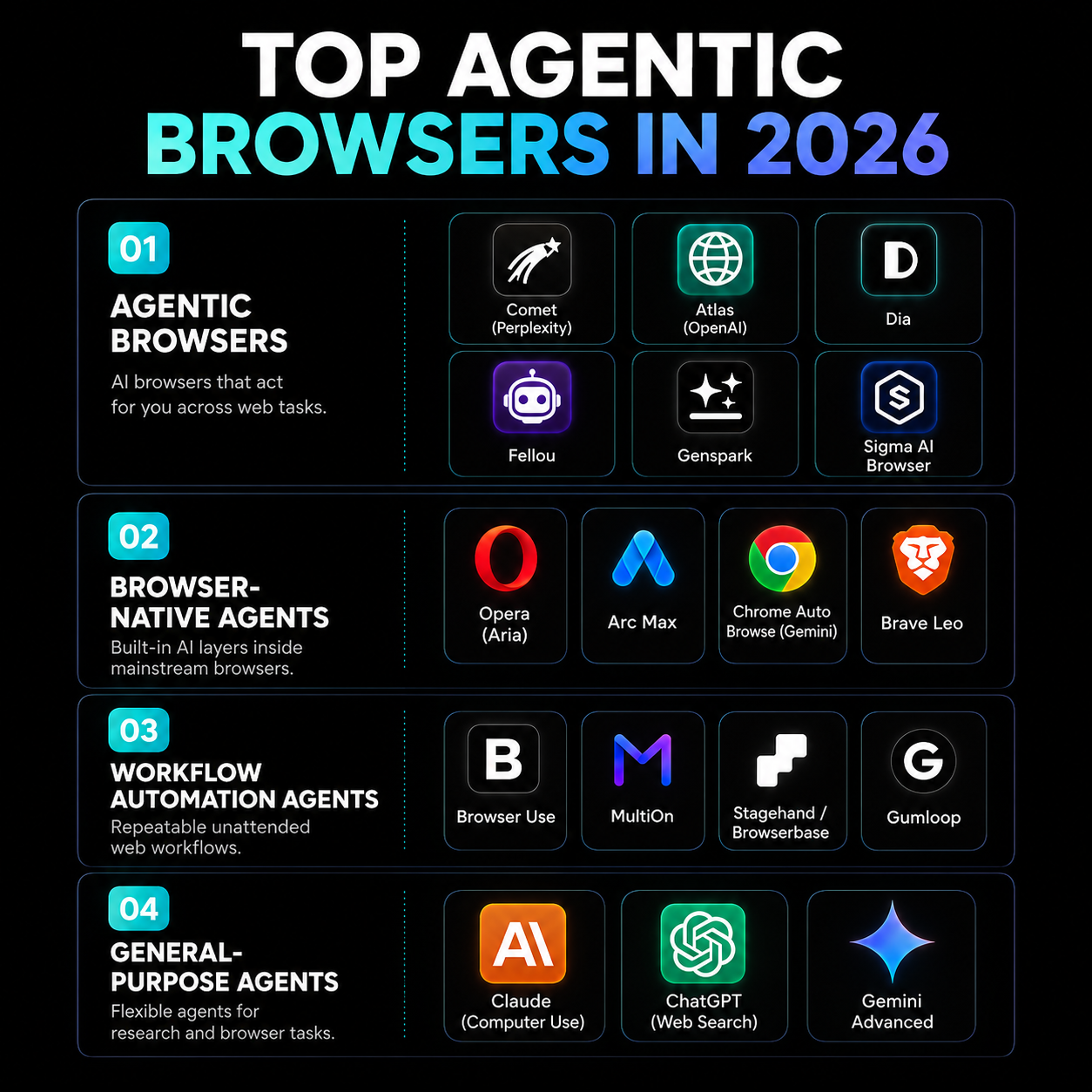
Selection follows the architecture and real-world roles currently defining the space. We emphasised tools that demonstrably move beyond sidebar assistants into active operators, and we grouped candidates by role:
- Agentic browsers — rebuilt from the ground up to operate as active web operators.
- Browser-native agents — AI layers built into mainstream browsers for contextual help and lightweight automation.
- Workflow automation agents — unattended, repeatable agents designed for scheduled extraction and resilient interaction.
- General-purpose agents — large models granted browser access for flexible, one-off tasks.
We prioritised (1) practical autonomy (tab and DOM-level actions), (2) support for authenticated sessions where stated, (3) privacy and on-device options, and (4) developer extensibility or no-code authoring where relevant. The list draws exclusively on the current landscape of agentic browser architectures and representative tools.
Summary table
| Name | Best for | Price | Rating |
|---|---|---|---|
| Comet (Perplexity) | Research + autonomous web tasks | Varies | Highly recommended |
| Atlas (OpenAI) | Authenticated multi‑step workflows | Varies | Highly recommended |
| Dia (The Browser Company) | AI-native workspace & agent builder | Varies | Recommended |
| Fellou | Parallel, multi-tab execution | Varies | Recommended (niche) |
| Genspark | On-device autonomy & privacy | Local-first / Varies | Recommended (privacy-focused) |
| Sigma AI Browser | Privacy-first agentic browsing | Local-first / Varies | Recommended (privacy) |
| Arc Max | Creative workflows & workspace rethinking | Varies | Recommended |
| Opera (Aria) | Seamless sidebar AI | Varies | Useful |
| Chrome Auto Browse (Gemini) | Autonomous browsing in Chrome | Varies | Useful |
| Brave Leo | Privacy-first native AI | Varies | Useful (privacy) |
| Browser Use | Developer-focused agent building (open-source) | Open-source | Developer favourite |
| MultiOn | Reliable complex task execution | Varies | Enterprise-focused |
| Stagehand / Browserbase | Resilient code + natural language SDK (open-source) | Open-source | Developer-focused |
| Gumloop | No-code/low-code team automation | Paid / Team | Team-focused |
| Claude (with Computer Use) | Flexible screen-level agent across web & local apps | Varies | Highly capable |
| ChatGPT (with Web Search) | Ad-hoc research & synthesis | Varies | Daily driver |
| Gemini Advanced | Google-integrated web actions and Docs/Sheets flow | Varies | Strong in Google ecosystem |
1. Comet (Perplexity)
Description: Comet is framed as research plus action — an agentic browser that takes a task definition and handles tab management, option comparison and bookings independently. It addresses the “now go do something with this info” gap.
Features:
- Autonomous tab and task management for research workflows
- Ability to compare options and complete multi-step tasks such as bookings
- Designed to reduce manual follow-up after summarisation
Pros:
- Built specifically to convert research into action without constant manual clicks
- Streamlines comparison and decision-making workflows
Cons:
- Higher autonomy requires careful goal definition and verification
- May still require human oversight for transactions and account-sensitive operations
Best for: Analysts and knowledge workers who want a single tool that researches and acts.
Price: Varies
2. Atlas (OpenAI)
Description: Atlas emphasises authenticated environments as a differentiator — it can operate inside accounts you are already logged into, executing multi-step workflows and shopping flows without triggering typical security blocks.
Features:
- Works within authenticated sessions to fill forms and perform multi-step tasks
- Designed to avoid common security flagging when operating in logged-in contexts
Pros:
- Strong fit for tasks that require account access (shopping, booking, account management)
- Reduces friction that arises when agents must hand back to the user for logged-in work
Cons:
- Authenticated actions increase the need for rigorous privacy and security practices
- Users must still verify outcomes and assumptions
Best for: Users who need agents to act inside their existing web accounts.
Price: Varies
3. Dia (The Browser Company)
Description: Dia is an AI-native workspace that includes an agent builder where users can drag and drop nodes (Visit Page, Extract, API Call) to build repeatable, scheduled research loops that operate directly against the browser’s DOM.
Features:
- Visual agent builder with node-based workflow composition
- Direct DOM-level interaction for robust extraction and navigation
- Scheduling for repeatable research loops
Pros:
- Low-code visual design enables non-developers to author robust agents
- DOM access increases resilience and precision when extracting data
Cons:
- Complex workflows can still require debugging and supervision
- Visual node interfaces can produce brittle flows if pages change frequently without adaptive logic
Best for: Teams who want a visual, repeatable way to run scheduled research or data-collection loops.
Price: Varies
4. Fellou
Description: Fellou is built for parallel execution, managing tasks across multiple tabs simultaneously rather than the single-threaded approach many other agents use.
Features:
- Parallel task execution across multiple tabs
- Designed to run concurrent comparisons and multi-page interactions
Pros:
- Efficient for workflows that require simultaneous page sampling or parallel scraping
- Can shorten end-to-end time for comparison-heavy tasks
Cons:
- Concurrent operations increase complexity and potential for interference between sessions
- May require careful resource and error handling
Best for: Users who need concurrent browsing tasks, such as large-scale comparison research.
Price: Varies
5. Genspark
Description: Genspark focuses on on-device, local AI models and offers an “Autopilot Mode” that can browse and act without heavy cloud dependency — appealing for privacy-conscious users.
Features:
- On-device model support for local processing
- Autopilot Mode for reduced cloud reliance
Pros:
- Reduces privacy trade-offs by keeping processing local
- Useful where network access or cloud-processing is a concern
Cons:
- On-device models may have capacity limits compared with cloud alternatives
- Some integrations and scale-dependent tasks may still need cloud services
Best for: Users or organisations prioritising privacy and local-first processing.
Price: Local-first / Varies
Ready to improve your marketing with AI?
Let’s discuss how AI workflows and agents can save hours every week, lower acquisition costs, and upgrade the quality of your marketing execution.
6. Sigma AI Browser
Description: Sigma is a privacy-first agentic browser that runs its assistant locally to log into sites, extract data and execute multi-step tasks without cloud tracking.
Features:
- Local assistant execution to avoid cloud telemetry
- Multi-step task automation while preserving privacy
Pros:
- Minimises third-party tracking and conversation storage
- Good fit for sensitive workflows and regulated environments
Cons:
- Local execution can limit collaborative features that rely on cloud services
- Users must manage local security and backups
Best for: Privacy-sensitive users and organisations needing agentic capability without cloud tracing.
Price: Local-first / Varies
7. Arc Max
Description: Arc Max reimagines the browser interface with deep native AI integration, focusing on workspace organisation and creative flow without getting in the way of the user.
Features:
- Integrated AI across the browsing workspace
- Emphasis on organisation and creative tasks
Pros:
- Smooth integration for creative workflows
- Less context switching than external agents
Cons:
- Best suited to single-session workflows rather than unattended automation
- May not offer deep multi-step automation features expected from agentic browsers
Best for: Creatives and knowledge workers who prioritise an integrated workspace.
Price: Varies
8. Opera (Aria)
Description: Opera’s Aria provides a seamless sidebar integration that reads the active page, generates content and executes basic prompt-driven commands without leaving the tab.
Features:
- Sidebar AI that interacts with the active page
- Prompt-driven commands directly from the browser
Pros:
- Convenient for in-page summarisation and content generation
- Low friction for routine tasks
Cons:
- Less suited for unattended, repeatable automation
- Limited when full DOM-level automation is required
Best for: Users who want lightweight, in-page AI without setting up agents.
Price: Varies
9. Chrome Auto Browse (Gemini)
Description: Google’s integrated agent lets Chrome autonomously scroll, click and navigate on your behalf using Gemini models — a native option for Chrome users.
Features:
- Autonomous navigation inside Chrome via integrated models
- Designed to perform scroll/click/navigation tasks
Pros:
- Tight integration with Chrome makes it convenient for many web tasks
- Leverages Google’s models for live web understanding
Cons:
- Native integration may be constrained by browser security and policy
- Users should verify actions when dealing with accounts or purchases
Best for: Chrome-centric users who want an integrated autonomous browsing experience.
Price: Varies
10. Brave Leo
Description: Brave Leo is a comprehensive, privacy-first AI built natively into the browser offering anonymous processing and zero conversation storage.
Features:
- Native, privacy-focused AI processing
- Anonymous operations with no conversation storage
Pros:
- Privacy-first stance reduces data exposure
- Good for sensitive browsing where data minimisation is required
Cons:
- May lack the breadth of integrations available to cloud-connected agents
- Advanced automation features might be limited compared with dedicated agentic browsers
Best for: Privacy-conscious users who want native AI without telemetry.
Price: Varies
11. Browser Use
Description: Browser Use is an open-source framework for building agents that interact with websites, fill forms and complete web tasks — an excellent self-hosted option for developers.
Features:
- Open-source stack for building web agents
- Designed for form-filling, interaction and task completion
Pros:
- Self-hostable and developer-friendly
- Good for teams that need control over execution and data flows
Cons:
- Requires developer resources to deploy and maintain
- Not a plug-and-play non-technical solution
Best for: Developers and organisations that want a self-hosted, open-source foundation for web agents.
Price: Open-source
12. MultiOn
Description: MultiOn is noted for reliability when executing complex tasks across the web. It handles authentication, unpredictable UIs and dynamic content to mirror human interaction.
Features:
- Robust handling of authentication and dynamic UIs
- Designed to mirror human interaction for resilient automation
Pros:
- High reliability for enterprise-grade, complex workflows
- Reduces brittleness when pages change or present captchas
Cons:
- Typically geared at enterprise use, which may mean higher cost or complexity
- May require support for complex deployment scenarios
Best for: Organisations that need resilient, reliable unattended automation.
Price: Varies
13. Stagehand / Browserbase
Description: This open-source SDK combines code-based browser control with natural-language actions to create resilient web workflows that withstand UI changes.
Features:
- SDK that blends programmatic control with natural language directives
- Designed for resilience against UI changes
Pros:
- Open-source approach gives developers control and transparency
- Resilience-focused design reduces maintenance overhead as sites evolve
Cons:
- Requires coding expertise to fully exploit
- Not a turnkey no-code solution
Best for: Developer teams who need durable automations and prefer open-source tooling.
Price: Open-source
For teams exploring automated web extraction and monitoring alongside agentic browsers, consider complementing with dedicated extraction tooling such as Firecrawl AI Autonomous Web Data Extraction and Monitoring.
14. Gumloop
Description: Gumloop is a visual, no-code/low-code automation framework for teams to turn repetitive web workflows into connected, scheduled agents.
Features:
- No-code visual authoring for web workflows
- Scheduling and team collaboration features
Pros:
- Accessible to non-developers and suitable for operational teams
- Helps codify repeatable, scheduled web tasks without custom scripts
Cons:
- No-code solutions can have limits when handling highly dynamic or unusual UIs
- May require escalation to developer tools for edge cases
Best for: Business teams that want to automate repetitive web processes without building bespoke scripts.
Price: Paid / Team
15. Claude (with Computer Use)
Description: Claude with Computer Use can take over the screen to execute variable tasks across web and local applications, making it a flexible screen-level agent.
Features:
- Screen-level agent capabilities across web and local apps
- Flexible instruction-driven tasking for one-off workflows
Pros:
- Very flexible for tasks that change each time
- Can interact with both web pages and local applications
Cons:
- Screen-level control can be fragile in non-standard environments
- Requires careful supervision when operating on sensitive data
Best for: Power users who need a generalist agent capable of cross-environment tasks.
Price: Varies
For an agentic AI workspace built by Anthropic, see Claude Cowork: Anthropic’s Agentic AI Workspace.
16. ChatGPT (with Web Search)
Description: ChatGPT with Web Search acts as a daily driver for ad-hoc queries, quick data retrieval and synthesising information from live public pages.
Features:
- Ad-hoc web retrieval and synthesis
- Useful for quick research and one-off tasks
Pros:
- Immediate availability for everyday research
- Good for synthesis and fast answers
Cons:
- Less suited for unattended, multi-step automation compared with dedicated agentic browsers
- May require manual handoffs to perform actions on pages
Best for: Users needing a reliable conversational agent for one-off research tasks.
Price: Varies
17. Gemini Advanced
Description: Gemini Advanced is deeply integrated into the Google ecosystem and is especially effective at pulling live web data and structuring it into Docs or Sheets for downstream work.
Features:
- Deep Google integration for Docs, Sheets and live web data
- Designed to structure retrieved data into usable documents
Pros:
- Excellent for workflows that end in Google Docs/Sheets
- Good live web data integration
Cons:
- Best suited to users embedded in the Google ecosystem
- May be less flexible outside Google-first workflows
Best for: Organisations and users who rely on Google Workspace for data capture and collaboration.
Price: Varies
If you are using Gemini in content pipelines, pairing it with automated repurposing workflows can be effective — for example, see How to Repurpose Video Content with Gemini and AI for a practical use-case.
How to choose the best option
Choosing the right agentic browser or web tool depends on a few concrete criteria. Use this checklist when evaluating options:
- Autonomy level: Do you want a research assistant that hands back suggestions, or a browser that can act autonomously and complete transactions?
- Authenticated access: Does your workflow require the agent to work inside logged-in accounts? If yes, prefer tools that explicitly support authenticated operations.
- Privacy model: Do you need local-first processing, anonymous handling or are cloud models acceptable? Local-first options (Genspark, Sigma) reduce telemetry.
- Resilience: For unattended, repeatable automation choose frameworks built for dynamic UIs (MultiOn, Stagehand / Browserbase, Browser Use).
- Integration: If your output must land in Docs, Sheets or other apps, select agents with native integrations (Gemini Advanced for Google ecosystem).
- Technical resources: No-code visual builders (Dia, Gumloop) suit non-developers; open-source SDKs and frameworks require development support.
- Oversight and governance: Any agent acting on your behalf needs logging, review and a rollback plan. Ensure you can audit actions and outcomes.
Mini glossary
Agentic browser — A browser rebuilt so an AI agent can operate as an active web operator (navigate, click, extract, fill forms) rather than just advise.
DOM (Document Object Model) — The structured representation of a web page that agents use to understand and interact with page elements.
Authenticated environment — A browser context where the user is signed into accounts; agents that operate here must manage credentials and session state carefully.
On-device model / Local-first — AI models that run on the user’s device rather than in the cloud, improving privacy but sometimes limiting scale.
Unattended scraping / Workflow automation — Agents designed to run scheduled, repeatable tasks across multiple pages and sites without continuous human input.
Agent builder — A visual or code-based interface to compose agent workflows (nodes like Visit Page, Extract, API Call) that perform multi-step operations.
FAQs
Q: Are agentic browsers safe to use with my accounts?
A: They can be, but safety depends on the tool’s security model. Tools that operate in authenticated sessions should provide clear safeguards: encryption of credentials, logging, permission prompts and audit trails. Even with safety, always supervise actions that involve financial transactions or account changes.
Q: Will an agent make mistakes?
A: Yes. Agentic browsers can reliably execute defined tasks, but they need precise goals and human judgment. You must check assumptions and verify outputs, particularly for decisions or transactions.
Q: Should I choose local-first or cloud-based agents?
A: Choose based on your risk tolerance and task scale. Local-first options reduce telemetry and are preferable for sensitive data. Cloud solutions often offer greater compute and integration features for large or collaborative workflows.
Q: Which option is best for non-developers?
A: Look for visual, no-code or low-code solutions such as Dia or Gumloop. These let non-developers design repeatable agents without writing scripts. For occasional research and synthesis, browser-native assistants (Arc Max, Opera Aria) or ChatGPT with Web Search provide immediate utility.
Q: How do I govern agentic automation in my organisation?
A: Establish policies for permissioning, logging, and approval. Use agents that support audit logs, restrict transactional authority, and require human review for high-risk tasks. Regularly test agents against representative sites to ensure resilience and correctness.
Final thoughts
Agentic browsers in 2026 are redefining what a browser can do: they can research, compare, and act. The right choice depends on whether you prioritise authenticated automation, privacy, developer control, or no-code convenience. Whatever you choose, remember the new mantra: less clicking, more judgement. Agents can execute tasks, but humans still set goals, check assumptions and verify outcomes.